Your documents, ready
for AI. In seconds.
Clean Markdown, every time.

Drop Word, PDF, or HTML files. Get clean, structured Markdown — optimized for Claude Desktop, ChatGPT, and any AI workflow. Windows desktop app on Microsoft Store.

Free trial on Microsoft Store · Windows desktop app · No subscription
Markdownizer main window — file queue and profile selection

What it does

Made for AI workflows

Markdownizer doesn't just convert files — it produces Markdown that language models can actually use.

AI-ready by default

YAML frontmatter, proper heading normalization, collected footnotes — every decision is made with token efficiency and language model parsing in mind, not visual aesthetics.

BYOK image descriptions

Bring your own API key for Claude, OpenAI, or run fully offline with local Ollama. Markdownizer passes surrounding text as context so descriptions are accurate — not just generic captions. Cost per image shown live. Your key is encrypted at rest and never leaves your machine.

AI tier

Batch & ZIP

Drop a folder, a ZIP archive, or dozens of files at once. Markdownizer unpacks, converts, and preserves your directory structure in the output.

Profiles per project

Save different settings as named profiles — one for Claude Desktop, one for quick one-offs, one for archival. Switch in one click. Output always goes exactly where you need it.

Smart PDF headings

PDF has no heading tags — structure must be inferred. Markdownizer scans the whole document first, maps its actual font sizes, filters running headers and footers, and recognizes section-number patterns like 1.2 Background as headings. No fixed thresholds applied blindly to every file.

Word intelligence

Code blocks are detected automatically — via the Word "Code" style or monospace font heuristic — and wrapped in fenced blocks so AI treats them as code, not prose. Text boxes (sidebars, callouts) are collected at the end as blockquotes instead of being silently dropped.

How it works

Drop onto a profile. Done.

The dashboard shows your profiles as cards. Drop files directly onto whichever profile you want — no extra clicks.

Step 1

Set up your profiles

Create a profile for each workflow — Claude Desktop, a quick one-off, a full archive. Each profile has its own output folder and conversion settings. You only do this once.

Step 2

Drop onto the card

Drag Word, PDF, or HTML files — or a folder, or a ZIP — directly onto the profile card in the dashboard. Markdownizer figures out what's inside and converts everything.

Step 3

Get clean Markdown

Converted files land in your output folder, ready to be added to a Claude project, committed to a repo, or fed into any tool that reads Markdown.

Supported formats

The documents you already have.

Markdownizer converts the formats that matter — and passes through everything that's already text-compatible unchanged.

.docx
Word

Headings, tables, lists, images, footnotes, and code blocks — all handled. Text boxes (sidebars, callouts) are preserved at the end instead of silently dropped.

.pdf
PDF (digital)

Digital PDFs with real text. Heading detection via font-size heuristics. Headers and footers removed.

.html / .htm
HTML

Web pages and exported HTML reports converted to structured, readable Markdown.

.md .py .json …
Pass-through

Already text? Copied unchanged. Extension preserved so AI tools understand the file type.

Profiles

One profile per workflow.

Claude Desktop, ChatGPT, a quick one-off, a full archive with all metadata — each workflow has different needs. Profiles let you capture those differences once and apply them with a click.

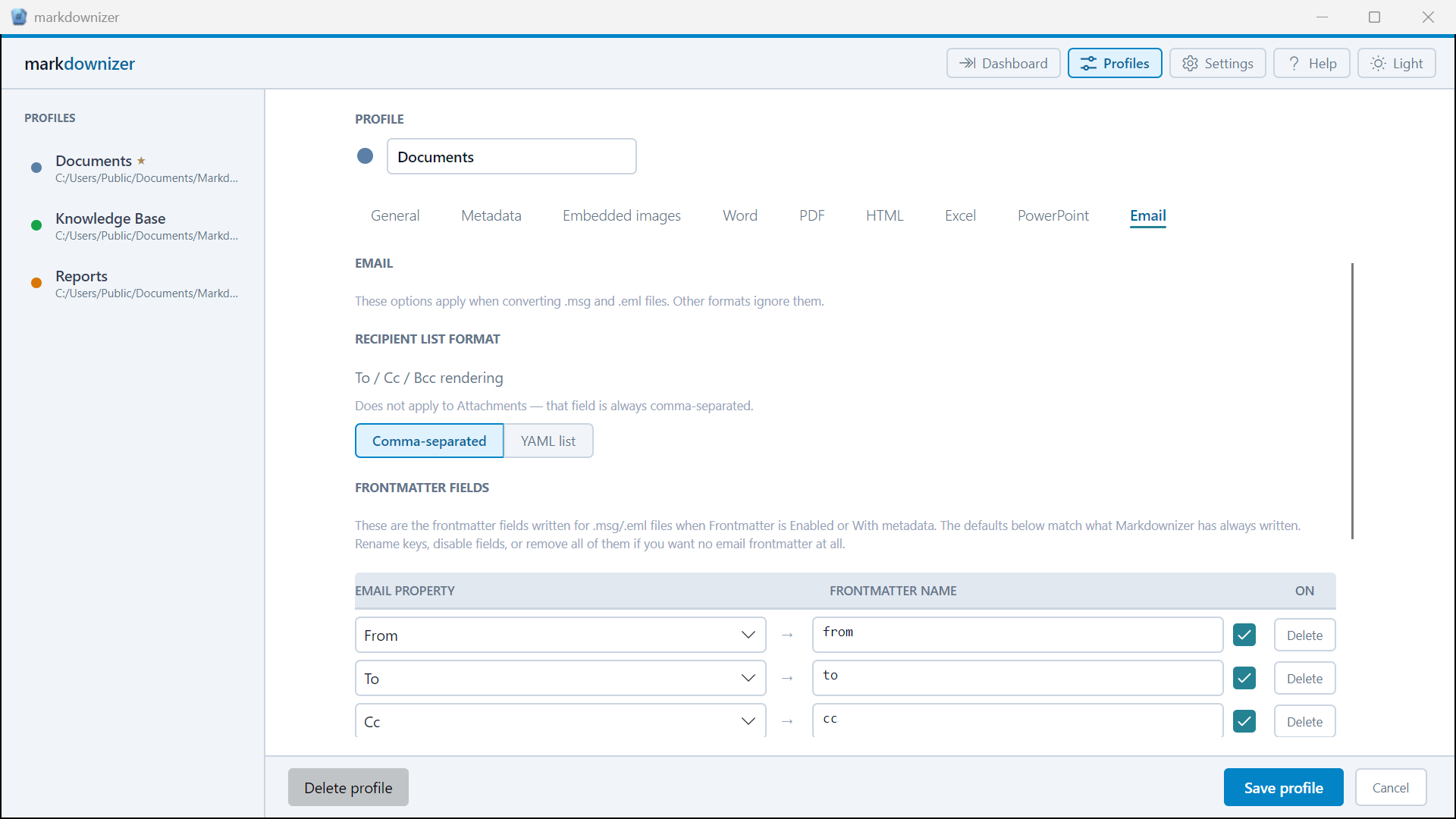
Every setting is per-profile: frontmatter, heading normalization, image handling, footnote style, destination folder, and filename collision behavior. Duplicate a profile, tweak one thing, name it. Done.

Custom frontmatter fields let you inject metadata into every conversion — with tokens like {{date}}, {{filename}}, and {{source_path}} resolved automatically. Useful for tagging documents by project, date, or origin before they land in your AI tool.

Markdownizer profile settings panel

Part of the family

One tool in a complete toolkit.

Markdownizer solves the input side — getting your documents into Markdown. The full workflow is what markdownheaven.com is about.

Get notified

Be the first on Microsoft Store.

Markdownizer launches on Microsoft Store with a free trial period. Leave your email and we'll send one message when it's ready — nothing else.

Free trial · Microsoft Store · Windows desktop app